How to save a recipe from an Instagram reel
Quick answer
Tapping the bookmark saves the reel but not the recipe. To keep the recipe itself you have four options: leave it in Instagram, screenshot the caption, copy it into a notes app, or share it to an app that reads the reel and lays the recipe out for you. resaw does the last one, pulling ingredients and steps from the caption and the spoken audio into a cook-along.
Cooking from a reel means holding your phone with wet hands, scrubbing back four seconds because you missed the amount of flour, and hoping the caption listed the quantities. Here are the ways to keep a recipe properly, and what each one costs you.
resaw is free on iPhone. Share a reel to it, or import your Instagram export file, and your recipes arrive as ingredient lists and steps.
Download on the App StoreWhy are recipe reels so bad at being recipes?
A reel is built to be watched once, quickly. A recipe needs to be read slowly, out of order, with your hands busy. Those two things are in direct conflict, which is why cooking from a saved reel feels like a fight.
Worse, the recipe itself might be in any of three places. Sometimes the full method is in the caption. Sometimes the caption says "recipe in comments" and the creator has pinned it below. Sometimes it is nowhere written down at all, and the only record of the quantities is the creator saying them out loud over music.
Whatever you use to keep the recipe, that last case sets a hard limit. If nobody ever wrote the quantities down, nothing can recover them from thin air.
Option one: save the recipe inside Instagram
Tap the bookmark. It takes half a second, and it is why most people have hundreds of saves.
The problem is what happens next. Saved posts are listed newest first with no text search, so a recipe from March is only findable by scrolling to March. The caption is not searchable, the ingredients are not extracted, and you cannot look for "the one with the miso butter". It also disappears if the creator deletes the post, because a save is a bookmark rather than a copy. In practice, saving inside Instagram is a way of feeling organized rather than being organized.
Option two: screenshot the Instagram recipe caption
Better than nothing, and it survives the post being deleted, which does happen.
But a screenshot is an image, so the text inside it is not searchable either, and it lands in a camera roll with everything else. Six months later you have a photo of some words about chicken, in date order, among four thousand other photos. It also captures whatever fitted on screen, so a long method gets cut in half unless you take three, and the video is gone: no watching what the dough is meant to look like.
Option three: copy the recipe into a notes app
This genuinely works, and of the manual methods it is the only one worth doing. Copy the caption, paste it into Notes or your app of choice, add the link so you can find the video again.
The cost is that it is manual, every time, for every recipe, which is exactly the friction that stops people doing it. Nobody keeps this up for two hundred recipes. It also loses the video, which matters more than people expect, because seeing what the dough is supposed to look like is half of why you saved a reel rather than a written recipe. And it does nothing at all for the reels where the quantities were only ever spoken aloud.
Option four: have the recipe pulled out of the reel for you
The last option is to let something read the reel and lay the recipe out properly: ingredients as a list, method as steps you move through one at a time, video still attached for the bits that need watching.
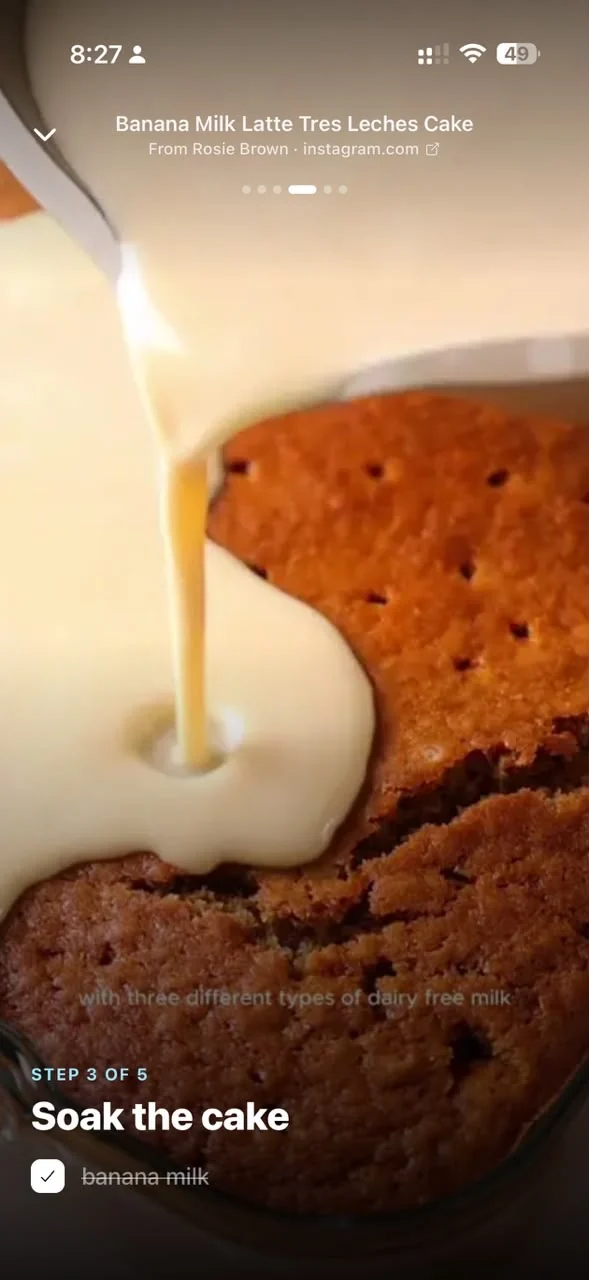
This is what resaw does with a saved recipe. You share the reel to it once, and it reads the caption and the audio, works out that it is a recipe, gives it a real title instead of the creator's handle, and files it with your other recipes. Open it later and there is a cook-along: the ingredient list in full, then one step at a time, with timers where the recipe calls for them.
The honest limit is the one described above. resaw reads what the reel actually contains. If the creator never stated the quantities anywhere, in the caption or out loud, then there are no quantities to lay out, and you get the video and a summary rather than a full cook-along.
Which option should you use?
| Option | Effort per recipe | Searchable later | Keeps the video | Survives deletion |
|---|---|---|---|---|
| Save in Instagram | Half a second | No | Yes | No |
| Screenshot the caption | A few seconds | No | No | Yes |
| Copy into notes | A minute or two | Yes | No | Yes |
| Have it pulled out | One share | Yes | Yes | Yes |
Read the table as a trade between effort now and effort later. Instagram's bookmark is the cheapest thing you can do today and the most expensive thing to undo in a year. Notes is the honest manual answer and the reason most people have twelve recipes saved properly and four hundred saved badly.
How to save an Instagram recipe to resaw
- Find the reel in Instagram
Either a new one, or one already sitting in your saved tab.
- Tap Share, then resaw
Use the share sheet rather than the bookmark. You may need to tap More the first time to find resaw in the app row.
- Add a note if you want one
Optional. Anything you type here is used when filing it, so "for Sunday" or "Diwali" is enough to route it where you want.
- Leave it a moment
The reel is read, titled and filed automatically. A recipe lands in your Recipes folder without you creating one.
- Open it when you cook
Tap Cook along. Ingredients first, then steps one at a time, so you are not scrubbing back through a video with your hands covered in flour.
How do I import recipes I already saved on Instagram?
If you already have years of saved recipes sitting in Instagram, you do not have to re-share them one at a time. Instagram will hand the whole lot over as a file, and resaw imports all of it in one step. The export guide covers exactly how, and the one setting that matters is the format: choose HTML, because Instagram's JSON export records little more than the URL, the handle and a timestamp, leaving the captions out. For recipes that is the difference between everything and nothing, since the caption is usually where the ingredient list lives.
Meta documents the request itself in the Instagram Help Center, Review and export a copy of your Instagram information. Checked 23 August 2026.
Common questions
What if the recipe is only in the comments?
Copy the pinned comment and add it as a note when you save the reel. Text you add yourself is read the same way the caption is, so the ingredients and steps come through.
Does this work if the creator never wrote the recipe down?
Only partly. If the quantities were never stated in the caption or out loud in the video, they do not exist to recover. You get the video, a title and a summary rather than a full ingredient list.
Can I still watch the original reel?
Yes. The link back to the original post is kept, so the video is always one tap away.
Does it work with recipes from websites?
Yes. Any link shared to resaw is read the same way, and recipe pages tend to work well because the ingredients and method are already written out.
Cook from what you already saved
resaw turns a saved recipe reel into a cook-along, files it with your other recipes, and keeps the original video one tap away.
Download on the App StoreFree, iPhone, iOS 17 or later. Share a reel to it, or import your Instagram export file to bring in the recipes from your whole saved history. See how resaw handles recipes.
More on getting your saves back
- How to export Instagram saved postsThe file that brings four hundred old recipe saves across in one step, and the format setting that keeps the ingredient lists.
- How to track restaurants you find on InstagramThe other half of saved food: the places you meant to eat at rather than cook from.
- How to organize Instagram saved postsWhat to do about the other three hundred saves that are not recipes at all.