How to organize Instagram saved posts
Quick answer
Instagram's built-in answer is Collections. Go to your profile, open the menu, tap Saved, then the plus button to create a named collection, or press and hold the bookmark on a post to file it as you save. Collections are free and work well for a couple of hundred saves. Past that, filing is manual, nothing is titled, and there is still no search.
Instagram does have a way to organize saves, and most people never touch it. It is worth knowing what it does well before deciding you need something else, because for a couple of hundred saves it may be all you need.
resaw is free on iPhone. Import your Instagram export file once and hundreds of saves are read, titled and filed into folders without you sorting any of them.
Download on the App StoreStart with Instagram Collections, because they are free and already there
Instagram lets you group saved posts into named Collections. It is the built-in answer and it works.
- Open your saved posts
Go to your profile, open the menu, then Saved.
- Create a collection
Tap the plus button, name it, and pick the posts that belong in it.
- Or file as you save
When you tap and hold the bookmark on a post, Instagram offers to drop it straight into a collection. This is the habit worth building, because filing later almost never happens.
If you have fifty saves and the patience to sort them, Collections genuinely solve the problem. Stop here.
Where do Instagram Collections run out?
They start to strain once the pile is large, for four reasons.
- Filing is manual. Every post has to be put somewhere by you, one at a time. Nobody retroactively files nine hundred saves.
- There is no search. Not across saves, not inside a collection: here is why, and what works instead.
- Nothing is titled. A saved post shows as its thumbnail and the account that posted it. A recipe you saved is "a video by @somechef", which is no help a year later.
- It only holds Instagram. The article, the screenshot and the link someone sent you live somewhere else entirely, so your actual collection of things is split across four apps.
None of these is a bug. Collections were built to tidy a saved tab, not to run a personal library, and they are honest about that. The question is only whether your pile has outgrown them.
How many folders should you actually make?
Five or six. This is the part people get wrong more often than the tool itself: they create twenty collections in an hour of enthusiasm, then cannot remember whether the pasta reel went into Food, Recipes, Dinner or Italy, so nothing gets filed and nothing gets found.
Name folders after the moment you will reach for them, not after the subject. Cook, Go, Buy, Read, Do beats a taxonomy of cuisines and cities, because you always know which one you are in. Add a folder only when one of the five has grown big enough to be annoying, and split it then rather than in advance. A city folder is worth creating the week before a trip and worth ignoring the rest of the year.
The test is simple: if you hesitate for more than a second about where a post goes, you have too many folders.
How to sort Instagram saved posts automatically instead of filing by hand
The other approach is to stop filing altogether and let something read each save and decide where it goes.
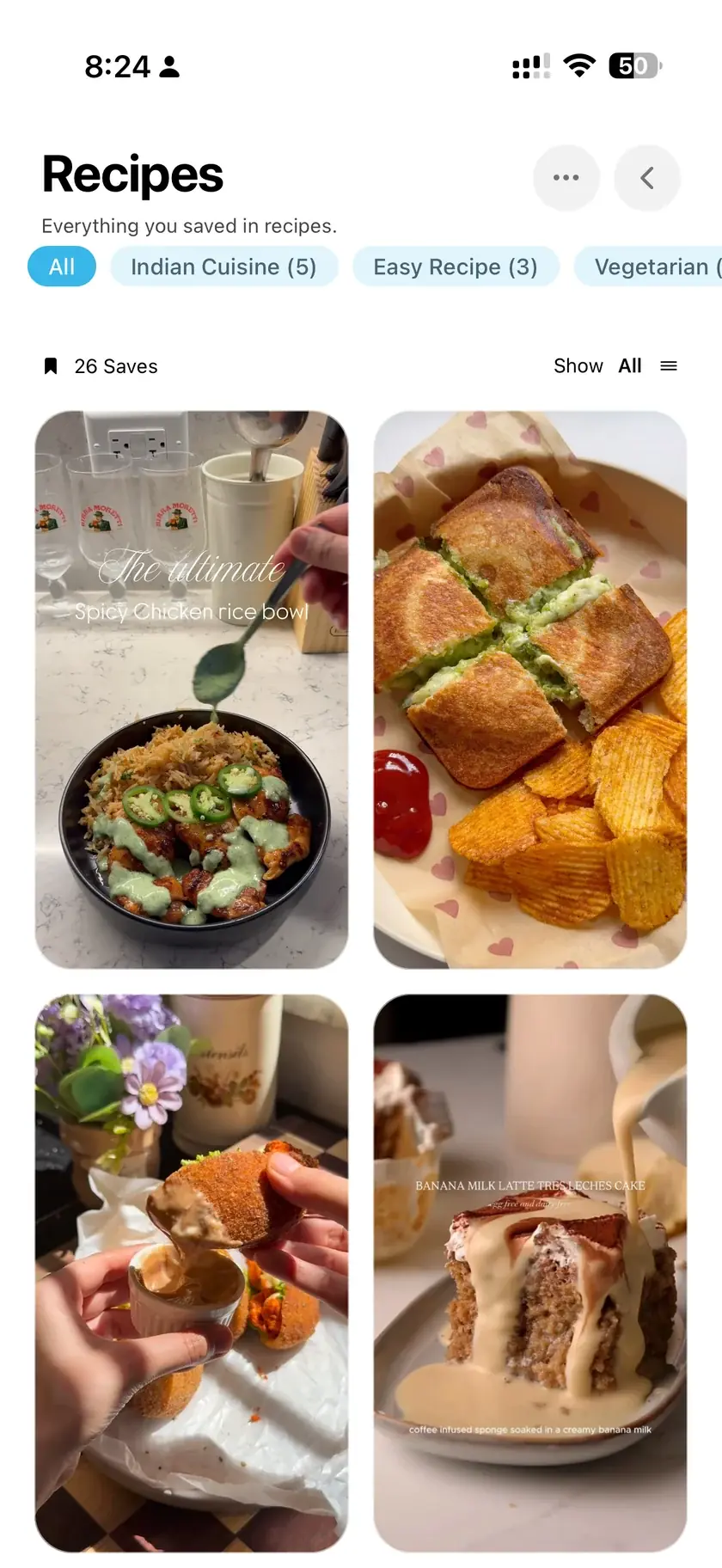
This is how resaw works. Each save is read, given a real title rather than a handle, and filed into a folder based on what it actually is: recipes with recipes, places with places, workouts with workouts. The folders are created as they are needed, so you do not set any of it up and you do not choose the five categories yourself.
Because every save has a title and a set of tags, the pile becomes searchable in a way Collections are not. You can also ask a plain question and get an answer drawn from your own saves, which is covered in the guide on finding something you saved. Places get pinned on a map as a side effect, which is the subject of the restaurants guide: a folder that builds itself is most obvious when it is a map.
How do I bring across the saves I already have?
The part that matters most is not new saves, it is the backlog. Instagram will export your saved posts as a single file, and all of them can be imported from it rather than re-saved post by post. Exporting takes a copy: your saved posts and collections stay exactly as they are inside Instagram. The export guide walks through it, including the format setting that decides whether your captions come with it, and captions are what makes automatic sorting possible at all.
Meta documents the request itself in the Instagram Help Center, Review and export a copy of your Instagram information. Checked 23 August 2026.
Collections or an app: which should you use?
Use Collections if your saves are in the dozens, you save mostly from Instagram, and you are willing to file as you go. It costs nothing and there is no reason to add another app.
Look further if you have hundreds of saves you will never file, if you want to search rather than scroll, or if the things you keep come from more places than Instagram. The dividing line is not really the number of saves. It is whether you are still willing to do the filing.
Common questions
Does Instagram have a limit on collections?
Instagram does not publish a hard cap for normal use. The practical limit is your patience for filing, not the number, and in practice five or six well-named collections beat twenty.
Can I organize saves from other apps in the same place?
Not within Instagram, which only holds Instagram content. A separate vault can take links, notes and images from anywhere through the share sheet.
Can I move a saved post between collections?
Yes. Open the post, tap and hold the bookmark, and pick a different collection. A post can also sit in more than one at a time, which is another reason to keep the list of collections short.
Do collections show up in my Instagram export?
The export gives you the saved posts themselves rather than a tidy copy of your folder structure, which is one more reason not to invest heavily in filing by hand.
For the saves you will never file by hand
resaw reads each save, titles it properly, and files it into folders on its own, so hundreds of saves become searchable without you sorting any of them.
Download on the App StoreFree, iPhone, iOS 17 or later. You import the export file yourself, and your Instagram collections are left untouched. See how the folders build themselves.
Where to go from here
- How to export Instagram saved postsThe backlog is the hard part. This is how you get all of it out in one file instead of re-saving post by post.
- How to find saved posts on InstagramThe full answer to the search problem this page only summarizes, including what to do when you barely remember the post.
- How to track restaurants you find on InstagramWhat a folder that builds itself looks like when the folder is a map of every place you saved.