How to find saved posts on Instagram
Quick answer
Open Instagram, tap Profile or your profile picture in the bottom right, tap Menu in the top right, then below How you use Instagram tap Saved. Everything you have bookmarked is there, newest first, with any collections shown at the top. There is no keyword search, so the only way to narrow it is by collection, by the account that posted it, or by roughly when you saved it.
You remember saving it. You remember roughly what it looked like. You have been scrolling for six minutes. This is the single most common complaint about saved posts, and it comes down to one design decision.
resaw is free on iPhone. Import your Instagram export once and all your saves get a real title you can search, plus answers to plain questions.
Download on the App StoreWhere are your Instagram saved posts, exactly
- Open your profile
Tap Profile or your profile picture in the bottom right of the Instagram app. On iPad, your profile picture is on the left.
- Open the menu
Tap Menu, the three lines in the top right.
- Tap Saved
It is listed below How you use Instagram. Every post, reel and video you have bookmarked is here. Collections appear as covers at the top; everything unfiled sits below them in one grid, newest first.
Meta documents these steps for the iPhone and iPad apps in the Instagram Help Center, Save posts you see on Instagram. Checked 15 September 2026.
Can I search my Instagram saved posts?
No. Instagram provides no text search across your saved posts and none inside a collection. The saved tab is a grid of thumbnails ordered newest first, and that ordering is the entire interface.
Captions are not searchable either, even though the caption usually contains the exact words you are trying to remember: the restaurant name, the ingredient, the neighborhood. Nothing is titled, so each save is represented by a small square image and, at most, the account that posted it. Instagram's own search box covers accounts, hashtags, places and audio, and none of that reaches into your saved tab.
The practical consequence is that a saved tab gets less useful the more you put in it, which is the opposite of how saving something is supposed to work. To search saved posts by keyword you have to move them somewhere that has read them and given them words.
What actually helps inside Instagram
There are a few real tactics, all of them narrowing rather than searching.
- Think in dates, not words. Saves are in date order, so the useful question is not "what was it called" but "roughly when did I see this". Anchoring to a month gets you to the right stretch of grid quickly.
- Check the account first. If you can remember who posted it, open their profile and scroll their posts instead. That is a much shorter list than your saved tab.
- Use collections as a filter. If the post was filed into one, you are searching dozens rather than hundreds.
- Check your likes. If you liked the post as well as saving it, go to your profile, tap Menu, tap Your activity below How you use Instagram, then Likes below Interactions. That list shows the 300 most recent posts you have liked.
None of these is a search box. They just make the pile smaller.
How to see your oldest saved posts
If scrolling through Saved is not getting you there, use your data export. The saved posts file in it has one entry per save, and each entry carries the date you saved it next to the link to the post. In the HTML version that date is printed as text with each save, so you can open the file in a browser and use Find to jump to a year. In the JSON version it is stored as a timestamp on each entry, under Saved on. The export guide shows how to request the file.
How do I find something I saved from a story or a DM?
It is not in the saved tab, which is the reason most people give up looking. Only posts and reels can be bookmarked. A story you kept goes to Archive, reached from the same profile menu, and only your own stories go there. A story someone else posted is gone once it expires unless you screenshotted it or added it to a message.
Something a friend sent you lives in the conversation, not in Saved. Open the chat and use the search inside that thread, which does look at message text, or scroll the shared media. If you tapped the bookmark on a reel that arrived by DM, then it is in Saved as normal, because at that point you saved the post rather than the message.
How to make Instagram saves findable by name
The underlying fix is to have something read each save, so it carries words you can search rather than just a thumbnail.
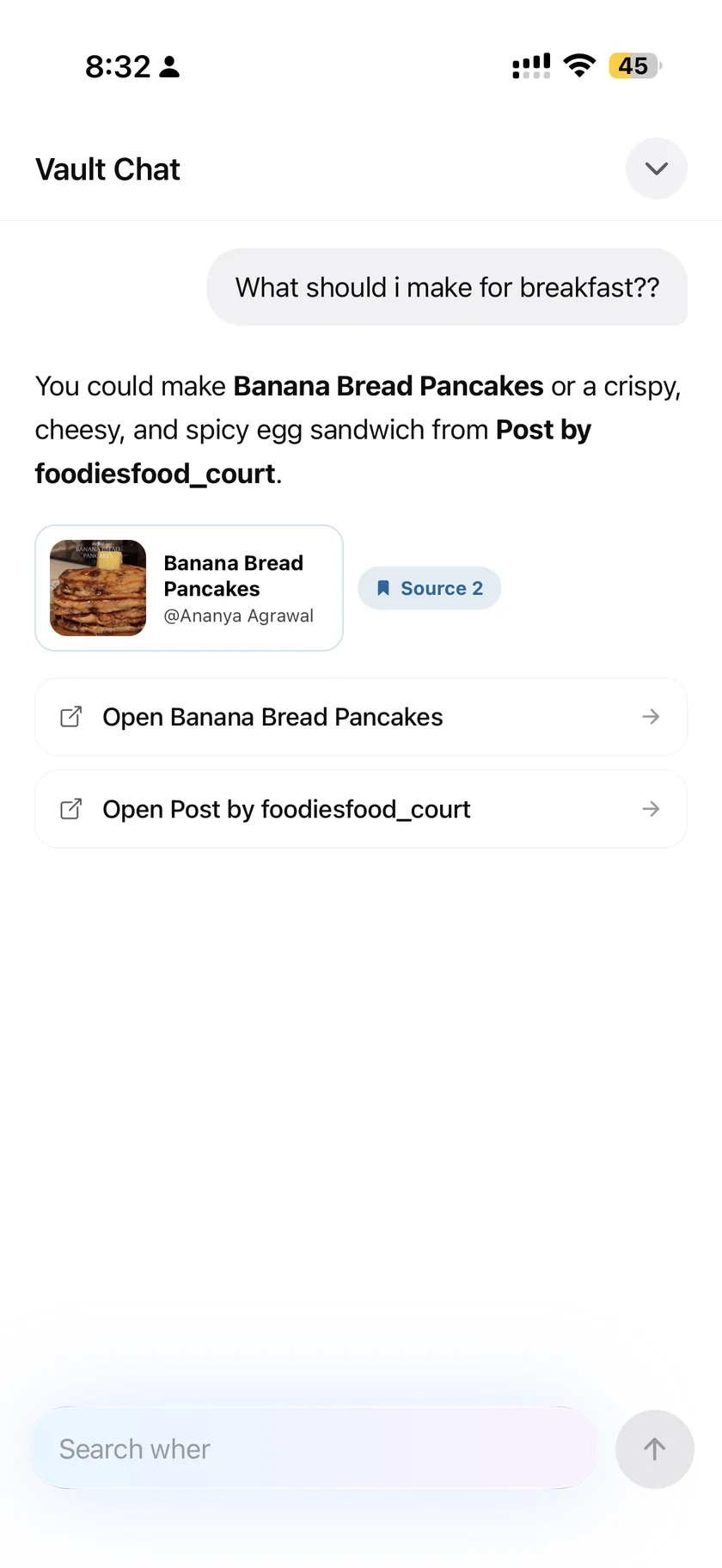
In resaw, every save is read and given a real title, a set of tags and a folder. That alone makes the pile searchable, because the words are now attached to the thing rather than sitting inside an image you cannot query.
Beyond search, you can ask a question the way you would ask a person: what did I save about Japan, or that pasta place someone recommended. The answer is built only from your own saves, and the posts it drew on are attached underneath so you can open the original and check. That matters, because a confident answer with nothing behind it is worse than no answer.
It also works when you cannot remember the words at all. Describing the thing loosely tends to be enough, which is closer to how memory actually works than typing an exact keyword.
How do I get years of old saves in?
Searching only helps if the old saves are there too, and you do not have to re-save them one at a time. Instagram will hand over your saves as a single file, and resaw imports all of them in one step. The export guide covers the request, including the HTML setting that keeps your captions, which for searching is the entire point: captions are the words you will be searching for.
Meta documents the request itself in the Instagram Help Center, Review and export a copy of your Instagram information. Checked 23 August 2026.
Common questions
Can I search my Instagram saved posts by keyword?
No. Instagram provides no text search across saved posts or inside a collection. The grid is ordered by date and that is the only way through it.
Does Instagram search captions of posts I saved?
No. Instagram search covers accounts, hashtags, places and audio, not the captions of posts sitting in your saved tab.
What if I unsaved it by accident?
Saved posts are not among the things Instagram's Help Center lists under Your activity, which covers items such as likes, comments, and content you have archived or recently deleted. If you also liked the post, look under Likes in Your activity, which shows the 300 most recent posts you have liked. If you downloaded your data before you unsaved it, the link is still in that export file.
Can I find a saved post on a computer?
Yes, through your data export. The Instagram Help Center documents Saved only for the app on iPhone, iPad and Android. On a computer, open saved_posts.html from your export in a browser and search the captions with the browser's find command.
Can I find something if I only vaguely remember it?
Not inside Instagram, where recognition depends on spotting a thumbnail. A vault that has read and titled your saves can answer a loose description, because it is matching meaning rather than an exact word.
Ask instead of scrolling
resaw reads every save so it carries words you can search, and answers plain questions using only your own saves, with the original posts attached underneath.
Download on the App StoreFree, iPhone, iOS 17 or later. Import your Instagram export file and all your saves become searchable in one go. See how asking your own vault works.
If the saved tab is the real problem
- How to organize Instagram saved postsSearching is one half. Folders are the other, and Instagram Collections only go so far before filing by hand defeats you.
- How to export Instagram saved postsHow to get the file that makes all of this possible, and the format setting that decides whether captions survive.
- How to track restaurants you find on InstagramFor the specific version of this problem where the thing you cannot find is a restaurant whose name you never knew.